
Mastering USB-C Vape Charging: Avoid Mistakes and Extend Device Life
USB-C does not mean “any charger is fine.” A vape with a USB-C port still has a small battery and a specific charging circuit, so the correct move is to use the supplied cable if you have it, choose a modest USB power source, keep the device on a stable surface, and unplug it once charging is complete. The biggest decision is not the plug shape; it is whether the charger’s output and charging behavior match what the vape manufacturer allows.
The short rule: match the device, not the connector
Many people search for vape richtig laden usb c because USB-C looks universal. The connector is convenient and reversible, but the port alone does not tell you how much power the device should receive. A phone, laptop, tablet, and vape may all accept USB-C cables while using very different charging limits.
For a vape, the practical rule is simple: start with the device instructions, then use a normal USB power source rather than assuming a high-output fast charger is appropriate. If the manual or label gives an input rating, follow that rating. If it does not, choose the more conservative charging setup and avoid heat, damaged cables, and unattended long charging sessions.

Correct steps to charge a USB-C vape
The order matters because many charging problems start with a loose cable, dirty port, overheated device, or unsuitable power source. Use this as a cautious routine for rechargeable vapes with USB-C ports.
- Check the device first. Make sure the vape is not visibly damaged, leaking, unusually hot, or swollen. Do not charge a device that looks physically compromised.
- Use the supplied or manufacturer-approved USB-C cable when available. If you need another cable, choose one that fits firmly without force and is not frayed, bent, or loose at the connector.
- Connect the cable to the vape gently. USB-C is reversible, so you should not need to angle, twist, or push hard. If it does not seat cleanly, stop and inspect the port.
- Plug into a suitable USB power source. A laptop USB port, tablet/TV USB port, modern wall outlet with USB, or standard USB adapter may work if it matches the device’s requirements. If the vape manual warns against fast charging or lists a low input rating, follow that instruction.
- Place the device on a firm, non-covered surface while charging. Avoid beds, sofas, pockets, and direct sunlight because trapped heat is the enemy of small rechargeable batteries.
- Watch the indicator light or screen. Most rechargeable devices signal charging and completion through a light change, screen icon, or indicator behavior. Because indicators vary, confirm what your device’s signal means in its instructions.
- Unplug when charging is complete. Leaving a vape connected after it is full usually adds no benefit and can add unnecessary heat exposure or battery stress over time.
If you are unsure how long charging should take, the safest practical approach is to avoid overnight charging and check the device at intervals. For a broader timing guide, see this educational article on how long a vape usually needs to charge.
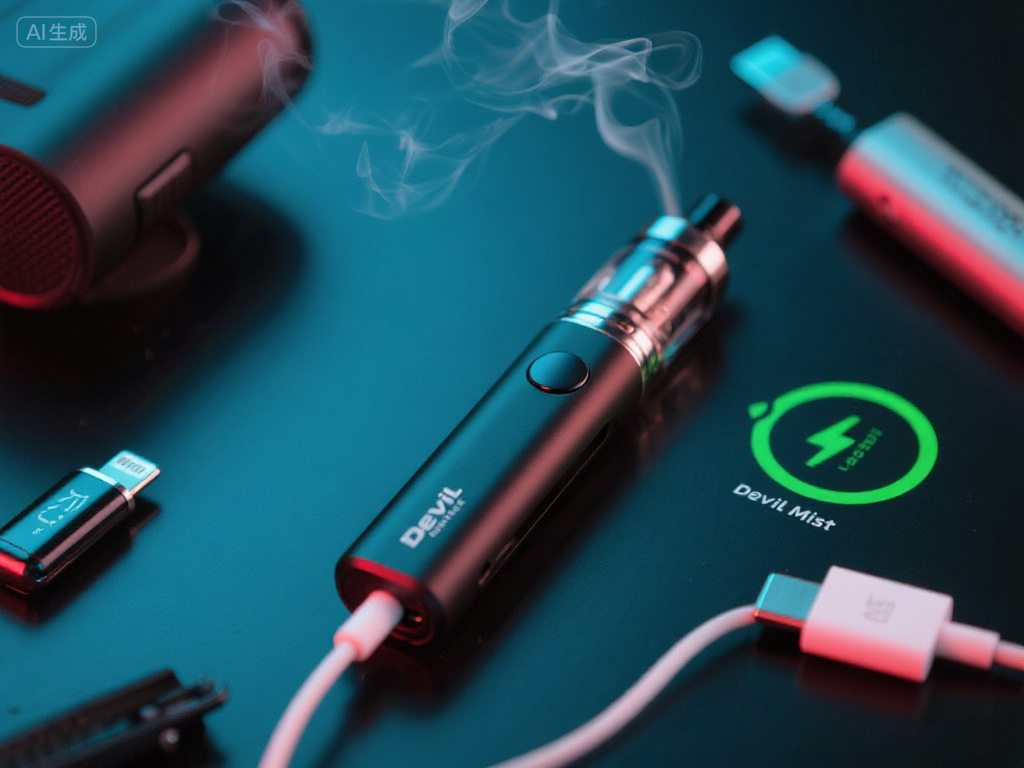
How to choose the right USB-C charger for a vape
The “right” charger is the one that matches the vape’s input requirements and does not force the device into a charging situation it was not designed for. If you still have the packaging, manual, or markings near the port, look for the input information first. If the manufacturer provides a specific cable or adapter instruction, treat that as the controlling source.
| Power source | When it may be reasonable | What to verify first |
|---|---|---|
| Supplied cable with a standard USB adapter | Often the simplest setup when the device instructions allow it. | Adapter output and whether the manual limits charging power. |
| Laptop, tablet, TV, or monitor USB port | Useful for slower, ordinary USB charging when the port is stable and powered. | That the port actually supplies power and the device shows normal charging behavior. |
| Phone USB-C charger | Possibly acceptable if the vape manufacturer permits it and the charger does not create heat or errors. | Whether it is a high-output fast charger and whether the vape manual forbids that type of adapter. |
| High-power laptop or fast-charge brick | Only when the device instructions clearly allow compatible USB-C charging behavior. | Input rating, heat during charging, and any warning signs after connection. |
| Cheap, damaged, or unknown cable/adapter | Not a good choice for troubleshooting or routine charging. | Replace with a known-good cable and a conservative power source before blaming the vape. |
A useful charger selection test is this: if the device gets unusually warm, the indicator behaves strangely, charging starts and stops repeatedly, or the cable feels loose, change one variable at a time. Try a known-good cable first, then a different ordinary USB power source. This is clearer than swapping everything at once and never knowing what caused the problem.
Common USB-C vape charging mistakes and what they can cause
Most charging mistakes are not dramatic in the moment. They show up later as shorter runtime, inconsistent charging, device errors, or a port that no longer holds the cable firmly. The goal is to remove avoidable stress from the battery and the charging port.
Assuming USB-C always means fast charging
A USB-C shape can appear on small low-power devices as well as high-power electronics. If a vape is designed for modest charging, connecting it to an aggressive fast-charging setup may not improve charging speed and may create heat or charging interruptions. The better assumption is that the vape controls the pace, not the charger label.
Using a cable that “sort of” fits
A USB-C plug should feel secure without being forced. If the connection works only at a certain angle, the cable or port may be worn or dirty. Continuing to charge that way can worsen the connection and make troubleshooting harder later.
Charging in hot places or under fabric
Heat is one of the most common practical enemies of rechargeable devices. Charging in a car in direct sun, under a pillow, or inside a pocket traps heat around the battery. Even if the device appears to charge, repeated heat exposure can affect performance over time.
Leaving it connected long after it is full
Many modern rechargeable devices manage charging automatically, but that does not make unlimited plug-in time useful. A full vape left connected for hours still sits near a power source and may experience extra warmth or repeated top-up cycles depending on its electronics. Unplugging after completion is a simple habit that reduces unnecessary stress.
Charging a wet, leaking, or damaged device
If e-liquid has reached the charging port, if the device has been dropped hard, or if the casing looks abnormal, do not treat charging as a test. Clean only the exterior according to the device instructions and avoid inserting objects into the port. If the device still looks compromised, charging is not the right next step.
For a deeper look at habits that shorten rechargeable vape battery life, this related guide on USB-C rechargeable vape mistakes explains the everyday behaviors that tend to create problems.
What overcharging can do to a USB-C vape
Overcharging is often used loosely to mean “leaving it plugged in too long.” The real impact depends on the device’s charging protection, battery condition, charger, and heat exposure. You should not assume every extra hour will instantly damage the vape, but you also should not treat overnight charging as harmless maintenance.
The most realistic effects are gradual: shorter time between charges, inconsistent battery indication, more warmth during charging, or a device that seems full but drains faster than expected. In some cases, a stressed battery or charging circuit can stop accepting charge reliably. If the device becomes hot, smells unusual, changes shape, or behaves erratically, stop charging and do not continue testing it repeatedly.
There is also a performance angle. A vape battery that is not holding charge well may deliver less consistent output before the device is empty. That can feel like weak vapor, early cutoffs, or a light that signals low battery sooner than expected. These symptoms are not always caused by overcharging, but repeated long charging sessions plus heat make battery wear more likely.
Signs the USB-C charging process is faulty
A faulty charging process is not always a dead device. Look for patterns. One odd blink may simply be a low battery signal, while repeated failures across known-good cables and power sources point to a more serious issue.
- No charging indicator appears. The cable may be bad, the power source may not supply power, the port may be dirty, or the battery may be unable to accept charge.
- The indicator turns on and off repeatedly. This often suggests an unstable connection, loose cable, weak USB port, or charging circuit interruption.
- The vape gets unusually hot. Mild warmth can occur during charging, but strong heat is a warning sign. Disconnect it and let it cool in a safe place.
- Charging finishes suspiciously fast but the battery drains quickly. The indicator may be inaccurate, the battery may be worn, or the device may not actually be reaching a full charge.
- The USB-C plug wiggles or falls out. Try another known-good cable. If every cable is loose, the port may be damaged.
- The device charges only with one specific adapter. That can mean the device is picky, the other adapters are unsuitable, or the cable setup is inconsistent. Use the manufacturer’s instructions as the reference point.
A simple troubleshooting order before you give up on the device
Changing several things at once can hide the cause. Work through the basics in order and stop if you notice heat, swelling, leakage, or a burning smell.
- Inspect the port and cable. Look for lint, liquid, bent connectors, corrosion, or a loose fit. Do not scrape inside the port with metal objects.
- Try a known-good USB-C cable. Cable failure is common enough that it should be tested before assuming the vape is broken.
- Switch to a different ordinary USB power source. Try a laptop USB port or standard adapter that matches the device instructions. Avoid using a high-power brick as your first troubleshooting step.
- Let the device rest if it is hot or very cold. Charging behavior can be unreliable when the device temperature is outside normal room conditions.
- Check the device’s indicator meaning. Some lights show charging, some show low battery, and some show errors. The same color can mean different things on different devices.
- Stop if the same fault repeats. A device that repeatedly overheats, refuses to charge, or shows physical damage should not be forced through more charging attempts.
FAQ: practical USB-C vape charging questions
What is the best USB-C charger for my vape?
The best choice is the charger setup your device instructions allow: usually the supplied cable and a suitable USB power source that matches the listed input. If the manual gives no clear rating, choose a conservative, ordinary USB source rather than a high-output fast charger, and monitor the device for heat or abnormal indicators.
Can I use my phone charger for my vape?
Sometimes, but do not decide by connector shape alone. A phone charger may be a fast charger designed for devices with different charging needs. Use it only if the vape manufacturer permits that type of charger and the device charges normally without excessive heat, repeated cutoffs, or strange indicator behavior.
How long should I charge my USB-C vape?
Charging time depends on battery size, remaining charge, cable condition, and power source. Many small rechargeable devices finish within a relatively short session, but the correct answer is the device’s own indicator and instructions. Avoid overnight charging as a default habit; check periodically and unplug when the charge is complete.
The charging habit that protects the device longest
To charge a USB-C vape correctly, think in terms of compatibility and heat control: use a suitable cable, choose a power source that matches the device instructions, keep the vape uncovered while charging, and unplug it when it is done. If charging becomes inconsistent, troubleshoot cable, port, and power source in that order instead of forcing faster charging. The small habits are the ones that most often prevent avoidable battery and port problems.
Related Guides in best vape
You can refer to similar articles..
- USB-C Rechargeable Vape Mistakes That Shorten Battery Life
- Wie lange braucht eine Vape zum Laden? The Real Timing Buyers Need
- Blueberry Ice Vape vs Plain Blueberry: Which Flavor Fits You?
- Bulk Disposable Vape Costs: What Changes the Real Unit Price
- How to Buy Vape Wholesale With Better Margins and Fewer Stockouts
- Disposable Vape Wholesale Mistakes That Can Shrink Your Margins
- Europe Fast Shipping Vape vs Local Stock: Which Saves More Time?
- Is a High Puff Disposable Vape Worth It? Costs, Battery, and Flavor
- Long Lasting Disposable Vape for Heavy Users: What Matters Most
- No ID Vape Belgium vs Verified Sellers: Which Is Safer to Use?
- How to Choose Prefilled Vape Wholesale Without Overstocking Slow Movers
- Vape Bulk Price Negotiation: What Retail Buyers Can Ask For


